Recently in one of my Joomla sites (HE), I needed to implement a timeline, with photos for several periods. I needed a component which features a slideshow, with a slider, and which can be organized by categories / albums. If it could support video, it would be even better! And ideally, photos cannot be ripped off ;)
Thank god for Expose! All the above rolled into one flash photo gallery, you can have a number of collections with several albums per collection. And the price for all that is a very reasonable $50. Its very neat, very professional, and is quite customisable. Downsides? Very few that I've found. The backend (Album Manager) is implemented in Flash and is slowish, and there's no indication that anything is going on, when you click any of the buttons. Also, the albums in collections are not opened by default, and I thought I was not managing to create any albums. Infact they were created, however they were not visible at first.
Overall, I'd give it a 4.5 out of 5.
Photo gallery will be live very soon!
PS. Got some customisations to make, I'm thinking of whether I should try writing an extendable component, give my 2c to the world of open-source. Hope I have the time and the will to go ahead with it!
Saturday, 27 January 2007
Joomla: Flash Photo Gallery - Expose

Tuesday, 16 January 2007
SharePoint 2007: Creating several site collections
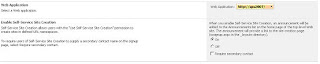
- Enable Self Service Site Creation in the Central Administration (Steps Below)
- Log into the Central Administration Site. (Note that this is a unique site collection as well, and if you have it located on a funny port number, it is usually a good idea to add it to your My Links).
- Click Application Management
- Click Self-service site management
- Select the correct Web application (that step is easy to miss) and select On for Enable Self-Service Site Creation
- Click OK
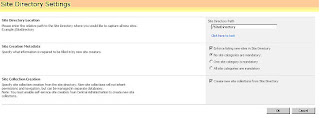
- Change the configuration settings under the Sites Directory (Steps Below)
- From the portal, use the Site Actions menu, select Modify All Site Settings. If you are not on top level site you will need to go to Top Level Site Settings.
- Under site collection administration, select Site Directory Settings.
- Select the checkbox to create new site collections from sites directory.
As taken from the following articles:
http://www.intranetjournal.com/articles/200610/pij_10_03_06a.html
WARNING: When you create a Site Collection, this is like creating a whole new completely independent site. You will not be able to share Groups / Permissions between the site collections, therefore consider the decision carefully. The idea that these are disabled by default obviously means, that to enable and work with them, you need to really know what you are doing.
SharePoint 2007: Favourite Links
SharePoint Design - Master Pages and default pages
http://sharingpoint.blogspot.com/2006/06/extreme-sharepoint-design-_115108192207171602.html
SharePoint 2007 SiteGroups - part 1 - the basics
http://www.sharepointblogs.com/tonstegeman/archive/2006/10/14/13889.aspx
Blogs I found useful:
http://www.sharepointblogs.com
http://www.sharepointblogs.com/helloitsliam/
http://www.sharepointblogs.com/vandest/
http://msmvps.com/blogs/shane/
http://weblogs.asp.net/jan/default.aspx
http://blog.u2u.info/DottextWeb/patrick/
http://weblogs.asp.net/soever/default.aspx
http://www.sharepoint-tips.com/ (includes nice utility pack)
SharePoint Technet :
http://technet2.microsoft.com/Office/en-us/library/63bb092a-00fe-45ff-a4b8-d8be998d1a3c1033.mspx?mfr=true
Content Types:
http://blogs.msdn.com/martinkearn/archive/2006/03/27/561809.aspx
http://www.msd2d.com/content/tip_viewitem_03.aspx?id=d5fd9392-25e3-4771-b563-b25fceb55c52
Navigation:
Part 1: http://weblogs.asp.net/soever/archive/2006/05/31/SharePoint-2007-navigation-dissected-_1320_-part-1.aspx
Part 2:
http://weblogs.asp.net/soever/archive/2006/07/24/SharePoint-2007-navigation-_2D00_-part-2.aspx
Part 3:
http://weblogs.asp.net/soever/archive/2006/07/27/SharePoint-2007-Navigation-_2D00_-part-3.aspx
Features:
http://sharethispoint.com/archive/2006/07/17/11.aspx
http://www.sharepointblogs.com/files/97/tbaginski/entry8420.aspx (Feature Manager)
How to: Add a Recurring Event to Lists on Multiple Sites
http://msdn2.microsoft.com/en-us/library/ms434156.aspx
Customising the Site Directory in MOSS 2007
http://glenc.wordpress.com/2006/07/23/customizing-the-site-directory-in-moss-2007/
User Profiles and Audience Targeting in SharePoint 2007
http://www.developer.com/net/net/article.php/11087_3659776_1
SharePoint Folders (including Logs)
http://blogs.vertigosoftware.com/ericc/archive/2006/09/13/SharePoint_2007_Folders.aspx
